
Magic Commands: Find!
A practical guide to find with real examples: searching by name, type, user, permissions, and executing actions.
Series: Magic Commands
find is one of my favorite commands, not only because it has saved my life on multiple occasions, but because of the sheer number of ways we can use it. Find essentially searches for something within the operating system; the best part is that we can gradually execute actions on whatever we find.
Basic usage
find "path_to_search" -name "filename"Where:
- path_to_search — the full path where we’ll search for the file.
- -name — option to search by name. Remember it’s case sensitive.
- filename — the name of the file to search for.
Example 1 — Search for a file across the entire system
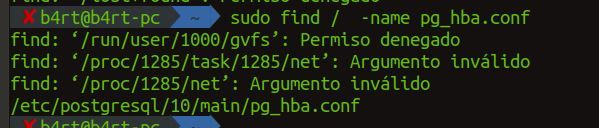
We’ll search for the pg_hba.conf file, which contains the PostgreSQL configuration. We use / to search the entire system:
find / -name pg_hba.confAs a regular user you’ll see “Permission denied” errors in system directories. As root (or with sudo), you’ll get the full path without restrictions.
Example 2 — Search by type
We use -type to specify whether we’re looking for directories or files.
Search for directories (-type d):
find /home/ -type d -name 'movies'Search for files (-type f): Here we use * to find all images of a given format:
find /home/ -type f -name '*.jpg'Example 3 — Search by user (UID)
If we want to find directories or files owned by a specific user, we use -uid. This is very useful when a malicious user exists on a system and we want to find all files they created. First identify the user’s ID:
id username
# uid=1001(b4rt) gid=1001(b4rt) groups=1001(b4rt)

find / -uid 1001
Example 4 — Search by group
Similarly, if we want to search by a specific group, we use -group followed by the name or ID of the group:
find / -group developers
# or by GID:
find / -gid 1002
Example 5 — Search by permissions
We can search for files with specific permissions using -perm:
# Files with exactly 644 permissions
find /home/ -type f -perm 644

# Files with the SUID bit set (potential security risk)
find / -type f -perm -4000

# Files writable by any user
find / -type f -perm -o+wExample 6 — Search by modification time
We can search for files modified in the last N days with -mtime:
# Files modified in the last 24 hours
find /var/log/ -type f -mtime -1

# Files modified more than 30 days ago
find /home/ -type f -mtime +30

# Files modified exactly 7 days ago
find /home/ -type f -mtime 7
Example 7 — Search by size
With -size we can search for files by size:
# Files larger than 100MB
find / -type f -size +100M

# Files smaller than 1KB (possibly empty or dummy files)
find /tmp/ -type f -size -1k

# Files of exactly 0 bytes
find /var/log/ -type f -empty
Example 8 — Execute actions on results
The real power of find is the ability to execute actions on what it finds, using -exec:
# Delete all .log files older than 7 days
find /var/log/ -type f -name '*.log' -mtime +7 -exec rm {} \;

# Change permissions on all .sh files found
find /home/b4rt/scripts/ -type f -name '*.sh' -exec chmod +x {} \;

# Copy all .conf files to a backup directory
find /etc/ -type f -name '*.conf' -exec cp {} /backup/etc/ \;Example 9 — Combining conditions
We can combine multiple conditions with -and (implicit), -or, and ! (negation):
# .jpg OR .png files
find /home/ -type f \( -name '*.jpg' -o -name '*.png' \)

# .conf files NOT owned by root
find /etc/ -type f -name '*.conf' ! -user root

# Empty directories
find /tmp/ -type d -empty
Most used options summary
| Option | Description |
|---|---|
-name | Search by name (case sensitive) |
-iname | Search by name (case insensitive) |
-type f/d/l | Search for files / directories / symlinks |
-uid / -gid | Search by UID or GID |
-user / -group | Search by username or group name |
-perm | Search by permissions |
-size | Search by size |
-mtime / -atime / -ctime | Search by modification / access / change time |
-empty | Find empty files or directories |
-exec | Execute a command on the results |
-delete | Delete results directly |
find combined with grep, xargs, or -exec is a very powerful tool for system administration, security audits, and scripting.
Comments
Stay in the loop
New posts about Linux, debugging, and systems programming. No noise, no spam — just signal.